Creating your first scene
Send us an assembly and we turn it into a scene your AI can answer from. No cleanup, no account, and a human reviews every one before it ships.
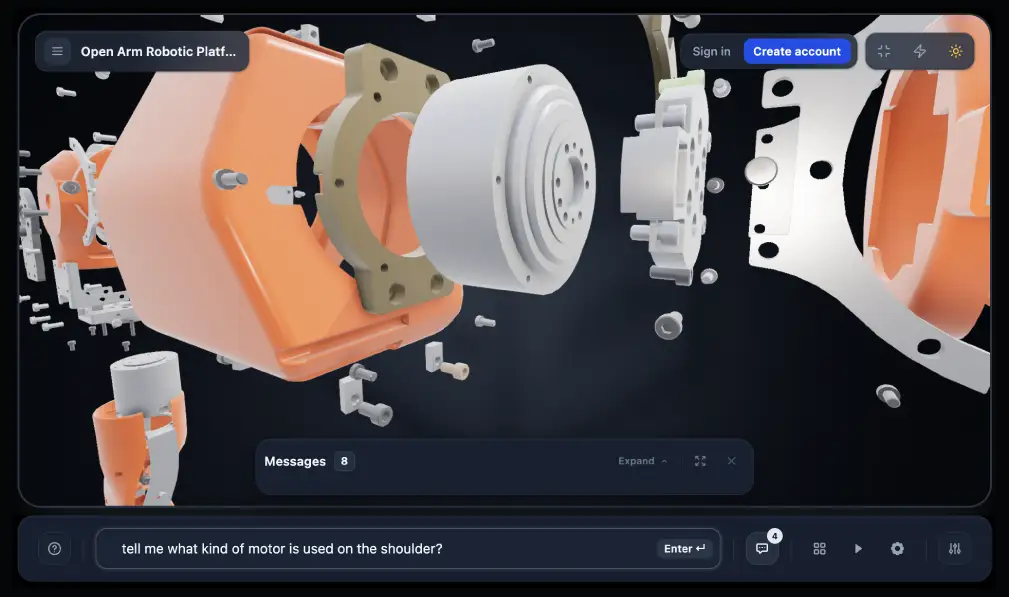
Your first scene is done for you. You send an assembly, our pipeline works out what every part is and how it relates to the rest, a human engineer checks the result, and you get two links back by email. There is no software to learn and no account to create.
Send an assembly and get back a live interactive scene plus an MCP endpoint, typically within 48 hours.
What you get back
A live scene. An interactive copy of your assembly that opens in any browser. Send it to a customer, a distributor, or your own support team — they click a part and it explains itself.
An MCP endpoint. One URL you paste into Claude, ChatGPT, or an internal agent. Ask “what’s the torque spec on the drive coupling?” and your product answers, with the part highlighted in 3D.
Both arrive by email, typically within 48 hours.
What to send
A 3D model of the assembly in GLB, FBX, OBJ, or STL — or a zip containing one. No cleanup, no prep, no renaming.
GLB, FBX, OBJ, STL, or a zip. No cleanup and no renaming — unlabelled parts are the point.
You don’t need to tidy the model first. The pipeline expects unlabelled parts with machine-generated names — that is the problem it exists to solve.
What makes a good first scene
Any assembly works, but some make a far better demonstration than others:
Enough parts to be interesting. An assembly with real sub-components shows far more than a single moulded shell.
Something people ask questions about. A product your support team or your customers already field questions on will show value immediately.
Serviceable structure. If parts come apart in the real world, the scene can demonstrate that — teardowns and repair sequences are where this lands hardest.
The intake form, step by step
Step 1 — About you
Name, email, and company; role is optional. Your two links arrive at this address and nothing else does.
Step 1 — name, email and company. Your two links arrive at this address.
Step 2 — Your scene
Upload the model file. A preview appears as it loads so you can confirm you sent the right assembly before you continue.
Step 2 — a preview appears as the model uploads, so you can confirm you sent the right assembly.
Step 3 — Review and terms
Confirm what you’re sending and accept the terms. That’s the last step — there’s no payment step and no account to set up.
What happens after you submit
The pipeline reads the geometry. It identifies every part, works out relationships and motion, flags duplicates, and prepares the assembly for analysis.
The parts get named and described. Machine-generated names become real ones, parts are grouped by function, and a knowledge base is built from what the geometry shows.
A human engineer reviews it. Nothing ships unreviewed — this is the step that keeps a half-understood assembly from reaching your customers.
Your two links arrive. Typically within 48 hours of submitting.
Every part identified, named, and grouped by function — then checked by a human engineer before anything ships.
Your geometry stays yours
Source CAD is never handed to the assistants your scene connects to. The AI reads a structured description of the assembly — names, relationships, materials, measurements — not your original file, and scene media is served through signed, expiring URLs rather than a public bucket.
Once your links arrive
Open the live scene and click a few parts to see what the pipeline understood.
Open the scene in 3DScribe Studio and copy its MCP connector URL, then follow the Claude or ChatGPT install guide in this section.
Ask concrete questions first: name a part, ask how something comes apart, ask for dimensions.
Common questions
Do I need an account?
No. The first scene requires no account and no payment.
What if my assembly is very large?
Send it. Part count affects how long processing takes, not whether it works — and if anything about the file needs a conversation, someone will reply to the address you gave.
Can I send more than one?
Start with one. Once you’ve seen what comes back you’ll have a much better sense of which of your products deserves the same treatment.
What if the names come back wrong?
Tell us. A scene is not frozen once it ships — descriptions and materials can be corrected, and a human already reviewed it, so a mistake is a conversation rather than a re-submission.