Deep dive: the interactive 3D experience
Everything your agent can do inside a published scene — the ten capabilities it operates the model with, how people talk to it, and what you configure per audience.
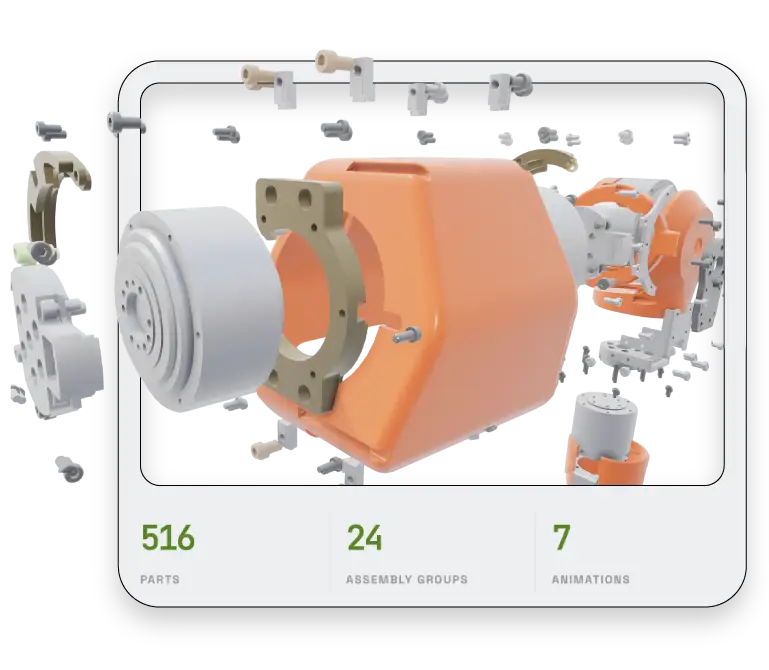
A published scene isn’t a 3D viewer with a chatbot bolted onto it. It’s an agent that can operate the model while it talks — framing a part as it names it, hiding everything else when you ask it to, playing the disassembly it just described. This is what it can do, and what you decide about each of it.
An agent that operates the model while it talks: framing a part as it names it, hiding everything else when asked.
How people interact with it
There is no syntax to learn and no command list to memorise. People reach the same capabilities several ways, and most switch between them without thinking about it:
Ask in words. “What is this?” · “How do I remove it?” · “Show me the boiler.”
Click a part. Tap anything in the 3D and the agent resolves what it is and explains it — no name or part number needed.
Orbit and frame. Drag to look around, or let the agent move the camera for you.
Isolate and hide. “Hide everything except the arm” works on a part or a whole group.
Play a tour. Guided, narrated walkthroughs you authored in the studio.
Ask, click, orbit, isolate, or play a tour — most people switch between all five without thinking about it.
What the agent can do
Ten capabilities, all driven by plain conversation. Every one of them is something the agent does to the scene, not just something it says.
Director — staged walkthroughs it can pause and resume, so a long explanation becomes something you move through at your own pace rather than a wall of text.
Selection — selects what you clicked, or what you named, whether that’s one part or a whole group.
Visibility — hide, show, isolate, and restore. This is what makes “just show me the pump” actually mean something.
Color — recolours a scoped set of parts, with exceptions. Useful for “what would this look like in stainless?” and for making a subset legible.
Camera — selects and frames, orbits, zooms, and moves to named viewpoints, so what it’s talking about is what you’re looking at.
Animation — plays the motion you authored, narrated, pausable and resumable.
Callout — pins a visual annotation to a component, so a point stays attached to the part rather than scrolling away in chat.
Knowledge — answers from the specifications, functions, relationships and documents attached to the scene, grounded in what the scene actually contains.
Memory — a full session history, with undo down to individual attributes. “Put the colour back” works.
Clarification — asks, once, when a request is genuinely ambiguous, instead of guessing and being confidently wrong.
The last two are what make the rest safe to use. An agent that can recolour and hide things needs to be able to undo, and needs to ask rather than guess when “that one” could mean three things.
Ten capabilities the agent operates the scene with — selection, visibility, camera, colour, animation, callouts and more, all from plain conversation.
Why it understands “this thingy”
A plain 3D viewer knows triangles. It can tell you that you clicked a mesh; it can’t tell you what the mesh is.
Your scene carries structure — named parts, the groups they belong to, what physically touches what, and each part’s role in the assembly. So when someone clicks something with no idea what it’s called, the agent can resolve it to a named component, place it in its sub-assembly, and answer in context: “that’s the wrist-motor housing in the left gripper — it seats against…”
That structure is also why “hide everything else”, “how does this connect?” and “what comes off with it?” all work without anyone authoring those answers in advance.
Structure is what separates this from a viewer: named parts, their groups, what touches what, and each part's role in the assembly.
What you configure per audience
The same published scene serves different audiences at different levels of capability. Three access modes, each with its own defaults:
Signed-in users get everything: unlimited conversation, saved and switchable conversation history, voice, tour generation, and the full panel set — chat, parts, tours, view, colour and settings.
Public visitors — anyone with the link, no account — get conversation, the parts browser and existing tours, with a per-session message limit and no saved history.
Embedded scenes on your own site run leaner still: conversation and parts, with a message limit you can set.
What you’re really choosing is how much of the experience a stranger gets before they’re a customer, and how heavy the embedded version is on a marketing page. Panels that aren’t available to an audience aren’t shown to them at all — nothing is displayed and then refused.
Signed-in, public and embedded audiences each get their own capability set. Panels an audience can't use are never shown to them.
It carries your brand
Login, home, the viewer itself, and the embedded version all take your identity — not our infrastructure. Colours, typography, logo and welcome message are yours, and there’s no 3DScribe mark on the media unless you put one there.
Embedding it
A single iframe snippet places the whole conversational viewer into your own page or portal. Embedded scenes keep your branding, your voice, and your capability configuration; public embeds run with rate limiting and session isolation, so one visitor’s conversation never touches another’s.
One iframe snippet places the full conversational viewer in your own page, keeping your brand and your capability settings.
Choosing how much geometry leaves
Security is set per scene and per audience, because the right answer for a public marketing page isn’t the right answer for a distributor portal.
Stripped-down CAD — available. A cleaned, decimated mesh with proprietary detail removed, rendered in the browser. Lightest touch, and some geometry does ship to the client.
Server-side rendering — available. Geometry never leaves the server; the browser receives a rendered stream. Strong protection, at a server-rendering cost.
Neural field — in beta, expected September 2026. A baked, group-tagged neural field that renders locally with no mesh, no B-rep and no part tree in the payload — a rendering function rather than the model. Not available today; ask us if it matters to your timeline.
The same conversational experience runs on all three, so this is a security decision rather than a feature trade-off. Protection increases down the list.
Protection increases down the list, and the same conversational experience runs on all three — so this is a security decision, not a feature trade-off.
Being straight about estimates
Some answers are derived rather than looked up. Ask what a set of panels would weigh in stainless instead of aluminium and you’ll get a figure estimated from solid volume — useful design guidance, and explicitly not a weighing. The agent says so when it’s estimating; treat those numbers as direction, not specification.
Where this fits
Customer support — resolve “what is this / how do I…” visually, without a queue.
Repair and maintenance — show the removal, name the parts, list what comes off with it.
Field technicians — a product expert grounded in the actual machine, on the device in their hand.
Engineering knowledge — an always-current reference people talk to instead of scroll.
On the roadmap
Two capabilities are in development and not configurable today. They’re listed here because they come up in conversations about what the platform will do, and it’s worth knowing which side of the line they sit on:
Live telemetry — binding sensor or telemetry streams to specific components, so a reading lives on the part itself and “which parts are over temp?” resolves against the assembly rather than a dashboard.
Ticketing integration — turning a callout into a ticket in your system with the part reference and a visual attached, and reading your existing ticket history for resolution guidance.
If either is important to how you’d deploy this, tell us — it affects what gets built next.